Marketing Agencies with NetDrive — Shared Client Assets, No Duplicate Folders

How marketing agencies use NetDrive to mount Dropbox Business and team drives so designers and account managers work from one client asset library.
A twelve-person agency runs fifteen client accounts at once. Each client has a brand folder, campaign folders, and a pile of exported PSDs, PDFs, and video cuts, and the same file often exists in three places: the designer’s laptop, an email attachment, and “final_v3_REAL” on the shared drive. Mounting the agency’s Dropbox Business account as a drive with NetDrive gives everyone one path to work from, and the team features cut down on the “who overwrote what” conversations.


One Asset Library for the Whole Agency
NetDrive lets Google Drive, OneDrive, S3, SFTP, WebDAV and more appear as native drives on Windows and macOS — no syncing, no full downloads.
- Team drives published from one admin console
- File locking on every file type, not just Office
- Read-only drives for client-facing review folders
Free trial. Lifetime and subscription plans available.
Why Agencies Outgrow Shared Folders
Agency work is bursty and collaborative. A campaign might need a copywriter editing a Word brief, a designer swapping artwork into a layout, and an account manager pulling the latest export to send to the client, all within an hour. When each person keeps a private copy, versions diverge. When everyone works in the same cloud folder without any guard, two people eventually save over each other.
NetDrive addresses both halves. Mounting Dropbox Business (or another supported cloud) puts the shared library into Windows Explorer or macOS Finder as a normal drive, so nobody has to learn a new app. The team features then add the coordination layer on top.
Publishing Team Drives to Designers and Account Managers
With a NetDrive team license, an administrator can publish a team drive to members instead of asking each person to enter credentials on their own machine. New hires get the client asset library the day they are added, and someone leaving the agency is removed from the team console instead of chasing down saved passwords.
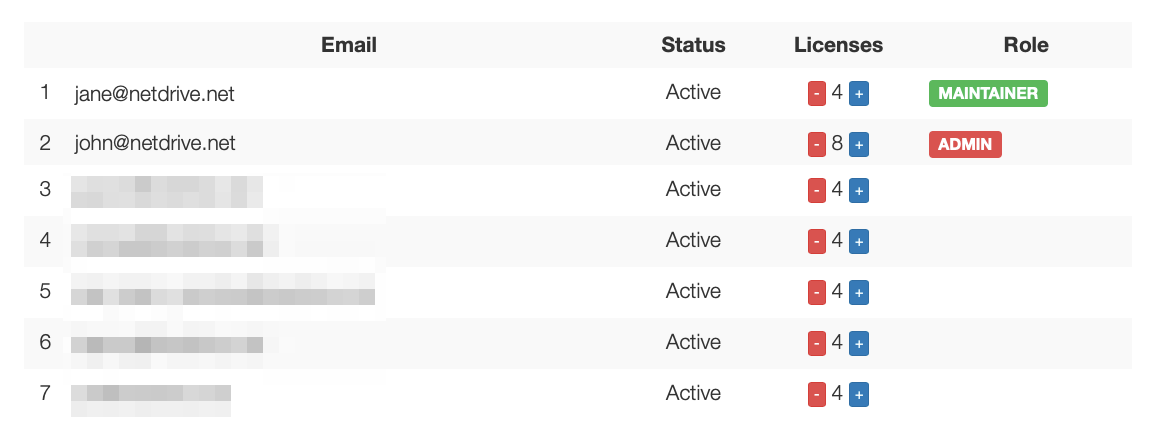
For the full walkthrough of publishing and sharing, see NetDrive Team Drive — Share Cloud Drives Across Your Entire Team.
Locking Files That Should Not Be Edited Twice
Layered design files do not merge. If two designers open the same PSD and both save, one set of changes is gone. NetDrive’s file lock works for all file types on a team drive (Microsoft Office files have been covered since 3.8.921, and all file types since 3.9.1190). When one person opens a file, others see it marked as locked by that person and can open it read-only instead.
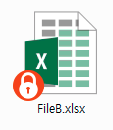
The habit to teach: if the icon says someone else has the file, ask them or work from a copy. Details are in Stop Overwriting Each Other — Office File Locking in NetDrive.
A Practical Setup for a Client Account
- Open NetDrive and click + Add Drive in the Drive Manager.
- Choose Dropbox Business and sign in with the agency account.
- Pick the drive letter (Windows) or mount name (macOS) you want, for example
A:for “agency”. - Set Mount on to Login or Boot, depending on whether the machine is a personal laptop or a shared editing workstation.
- Click Mount, then confirm the client folders appear in Explorer or Finder.
- For a client review folder, add a second drive with Drive Type set to Read-only drive, so a stakeholder walkthrough on a meeting-room PC cannot change files.
Step-by-step provider details are in Mount Dropbox Business on Windows with NetDrive and Mount Dropbox Business on macOS with NetDrive.
What NetDrive Does Not Do Here
Two limits are worth stating up front. NetDrive does not have an offline mode, so a designer on a flight cannot keep editing files that live only in the cloud. It also does not provide client-side encryption, so sensitive client material follows the security model of the cloud provider you chose. And sharable links are available only from the file browser, not from the mounted drive itself; see NetDrive File Browser for how that works.
Wrap-up
For an agency, the value is less about any single feature and more about removing the copies: one mounted library, team drives that new members inherit, and file locks that stop silent overwrites. If your team is mostly creative, Creative Team Collaboration with NetDrive covers the same tools from the studio side.
— Casey, NetDrive