Yandex
This guide covers Yandex Disk. You sign in with your Yandex account in the browser. For the parts of the Add drive form that every storage shares, see Add a drive.
Connect to Yandex Disk
- Click Drives in the left menu, and then click Add drive.
In Storage type, choose Yandex. It is in the Cloud storage group.
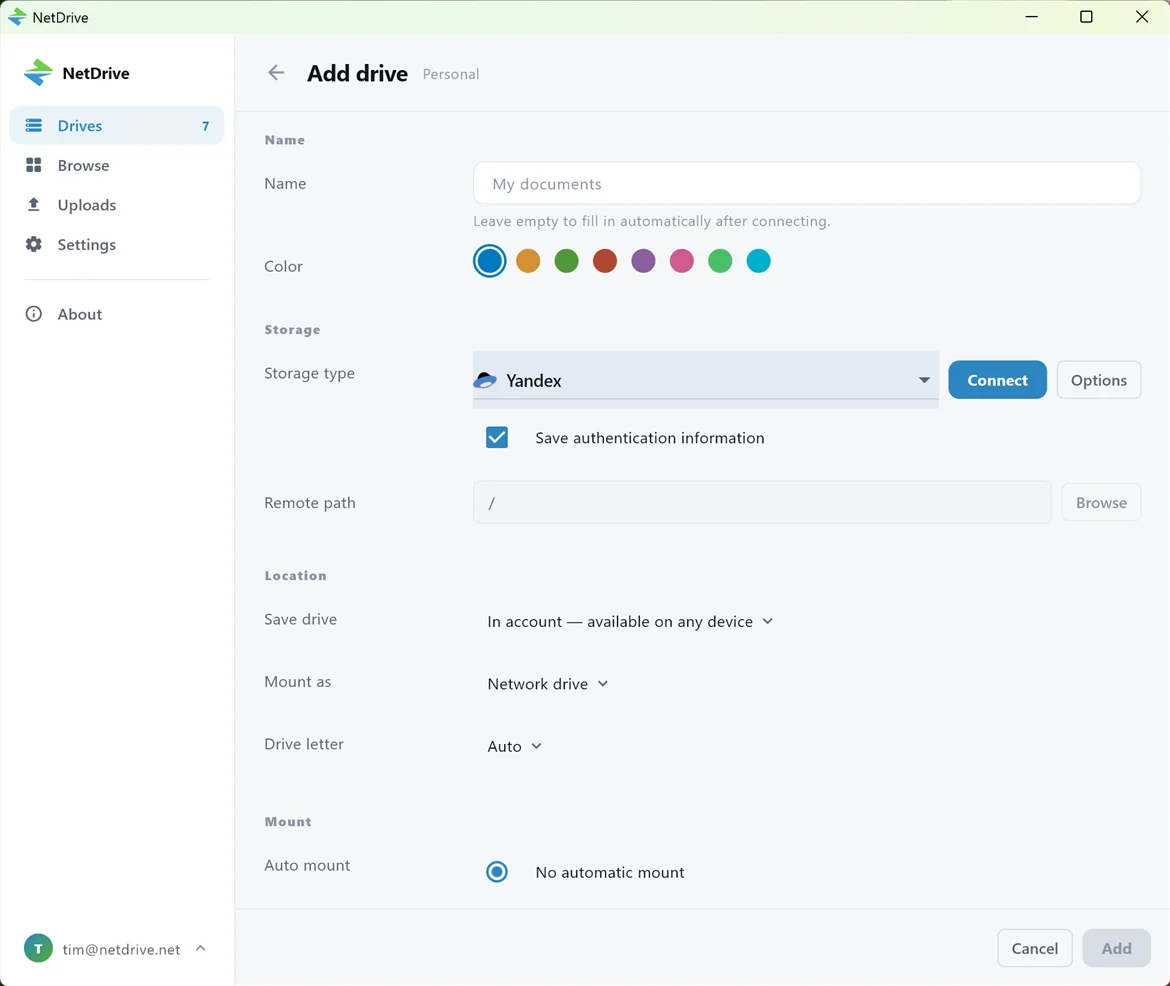
Click Connect. Your browser opens the Yandex sign-in page, and NetDrive shows Wait for authentication….
- In the browser, sign in with the account you want to connect and finish the steps there.
- NetDrive continues by itself. Your account appears under Storage type with Connected.
- If you want, click Options to change the options below, or click Browse next to Remote path to show only one folder.
- Click Add.
If you don't finish signing in within 5 minutes, NetDrive stops waiting. Click Connect again. See Connect to your storage.
Save authentication information under Storage type is selected by default. See Save authentication information.
Options
Click Options in the form. You can open it before you connect.
- Bandwidth: the speed limit for this drive in KB/s.
0(the default) means no limit. - Connection Timeout: how many seconds NetDrive waits when it connects to the server. The default and smallest value is
10.
Click OK to keep your changes. The drive's proxy is set with Proxy settings at the bottom of the screen; see Proxy for this drive.