About and updates
Click About in the left menu to see which version of NetDrive you use, your license, and the latest release notes. You can also check for a new version there.
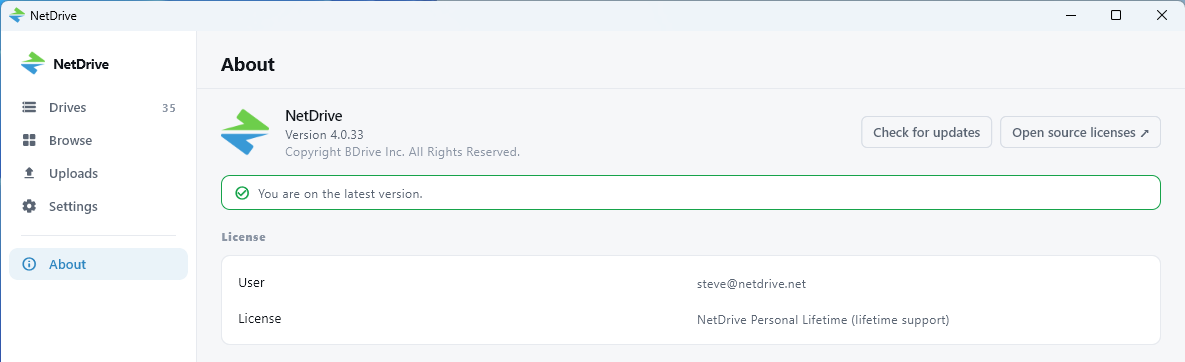
The About screen
- At the top: the NetDrive version, such as "Version 4.0.33", with two buttons. Check for updates checks for a new version; see below. Open source licenses ↗ opens the licenses of the open source software in NetDrive in your browser.
- Below them, the result of the update check: "You are on the latest version." Or, when a new version is out, a message such as "4.0.40 is out. You are on 4.0.33." with Download. A beta version is marked BETA. If NetDrive could not check, no message appears. Try again later with Check for updates.
- License: User is the email address you signed in with. License is your license, for example "NetDrive Personal Lifetime (lifetime support)". For plans, see License and Team License.
- Release notes: the three latest versions. Each shows the version, its build and release date, and the changes marked NEW, IMPROVEMENTS, FIXED, or ETC. Beta versions are marked BETA. If there are more, See all ↗ opens all release notes in your browser. If NetDrive cannot get the release notes, this part does not appear.
Update NetDrive
When you open About, NetDrive shows whether a newer version is out. Click Check for updates to check again now.
When a new version is out, click Download:
- On Windows, the NetDrive updater downloads and installs the new version, and then starts NetDrive again.
- On a Mac, the download opens in your browser. Install the new version as described in Install and uninstall.
On Apple Silicon Macs with macOS 26 or later, the first mount right after an update can fail and ask you to restart your Mac. See Common problems.
Automatic update checks
With Check for new versions automatically turned on in Settings > Updates, NetDrive checks after you sign in and then every 12 hours. When a new version is out, it shows Update Available: "NetDrive 4.0.40 is available. You are using 4.0.33."
- Release notes: opens the release notes in your browser.
- Skip This Version: NetDrive stops showing this message for that version. It shows the message again when a newer version comes out. Check for updates in About still finds the skipped version.
- Later: closes the message. NetDrive asks again at a later check.
- Update: does the same as Download in About.
If the NetDrive window is closed and NetDrive is running in the tray or menu bar, NetDrive shows a notification instead: "NetDrive 4.0.40 is available. Open NetDrive to update." The message appears when you open the window.
Some updates are required. Then the message says "NetDrive 4.0.40 is a required update. Download and install it to keep using NetDrive. You are using 4.0.33." This message cannot be closed. Click Download.
Beta versions
Beta versions are pre-release builds. To get them, turn on Check for beta versions too in Settings > Updates. Both the automatic checks and Check for updates then include beta versions, and they are marked BETA.
While you use a beta version, NetDrive includes beta versions when it checks, and it checks automatically even if Check for new versions automatically is turned off.
See Settings.